Studio live · Booking iOS builds

Native iOS, by Ikaroa

Built for iPhone.Earned on the App Store.

Swift, SwiftUI, the full Apple ecosystem. We design, build, ship and maintain native iOS apps that feel at home next to the ones already on the home screen.

Why iOS first

Four reasons the iPhone audience earns the first build.

Reason 01

iOS users pay.

Average revenue per paying user on iOS runs roughly four times what we see on Android in the same category. Whether the app is consumer subscription, in-app purchase, or paid download, the iPhone side of the audience is where the unit economics work.

Reason 02

The OS install base is uniform.

Within twelve months of release, the current iOS version is on roughly four-fifths of active devices. The team builds against a coherent target rather than fragmenting attention across a long tail of versions and OEM forks.

Reason 03

The platform is its own marketing.

A native iOS app earns visibility on the App Store, in Spotlight, in Siri suggestions, in Live Activities, on the Lock Screen, on the Apple Watch face, and inside CarPlay. None of these surfaces exist for an unwrapped web app.

Reason 04

Polish is table stakes here.

iPhone users have higher expectations than any other mobile audience. The bar that gets you a five-star review on Android gets you a two-star one on iOS. We build for the higher bar so we never have to engineer the difference later.

What we build

Six kinds of iOS app. One studio.

We are happiest on the categories below, each one earns a different slice of the Apple ecosystem, and the discipline of building across all six is what keeps the work sharp.

Category

Consumer + lifestyle

Subscription apps, social products, content readers, daily habit tools. Built for the home screen, Widgets, Live Activities and Lock Screen presence baked in so the brand earns surface area outside the app itself.

  • Daily habit tracker
  • Streaming reader
  • Subscription magazine
  • Wellness companion

Category

Fintech + payments

KYC flows, Apple Pay, Sign in with Apple, Secure Enclave for on-device keys, biometric step-ups, push for transactional events. Designed for the regulatory bar plus the App Store privacy review.

  • Mobile banking
  • Investing app
  • Crypto wallet
  • Expense management

Category

B2B + field tools

Inspection, dispatch, point of sale, on-site capture. Offline-first by default with sync queues. MDM-ready distribution through Apple Business Manager, no public App Store listing required.

  • Field inspection
  • Mobile POS
  • Dispatch + routing
  • Asset tracking

Category

Health + fitness

HealthKit reads and writes for activity, sleep, vitals; CoreMotion for on-device pedometer + altimeter; CMSampleBuffer pipelines for video form analysis. HIPAA-aware data handling on US deployments.

  • Run + ride tracking
  • Strength programming
  • Sleep coaching
  • Telehealth companion

Category

AR + spatial

ARKit world tracking and scene understanding, RealityKit for rendering, body and hand tracking, LiDAR for depth where the device supports it. Visionable on Apple Vision Pro from the same codebase where the app concept warrants it.

  • Product try-on
  • Showroom + retail
  • Surveying + measure
  • Spatial games

Category

Games + interactive

SpriteKit and SceneKit for 2D + 3D, Metal where the title needs every cycle, Game Center integration for leaderboards and matchmaking. App Store Optimised from the first build to give the launch its best chance.

  • Casual puzzle
  • Idle / incremental
  • Sports manager
  • Narrative + RPG

The Apple ecosystem

Twelve surfaces. One brand.

The App Store icon is the front door. Everything below is a window your brand can reach customers through without them ever launching the app, and we build each one in where it earns its keep.

Apple Pay

In-app purchase, one-tap checkout, Wallet pass issuance.

Sign in with Apple

Frictionless onboarding the App Store reviewers prefer.

Apple Watch

Companion apps, watchOS complications, independent watch apps.

Live Activities

Lock Screen and Dynamic Island presence for in-progress events.

Widgets

Home Screen + Lock Screen surfaces, configurable, deep-linkable.

App Intents

Shortcuts, Siri, Spotlight actions for tasks the app exposes.

HealthKit

Activity, sleep, vitals, read and write with the user's consent.

HomeKit

Accessory + scene control for connected-home products.

CarPlay

Audio, navigation, communication apps in the driving context.

iCloud

CloudKit + iCloud Drive for cross-device sync without a backend.

Push Notifications

APNs for transactional and engagement, Critical Alerts where the use-case earns it.

Vision Pro

Spatial-aware versions of iOS apps where the concept extends naturally.

The stack

Modern Swift, forward. No legacy ballast.

We work on the current Swift toolchain, strict concurrency, SwiftUI-first, SwiftData where it fits, so the codebase you inherit will still be productive in three years, not just on the day of handover. Every project tracks the current SDK; nothing we build today should look outdated when WWDC ships the next one.

Stack group

Language + UI

  • Swift
  • SwiftUI
  • UIKit interop
  • Swift Concurrency (async / await)
  • Observable framework
  • Strict concurrency checking

Stack group

Data + state

  • SwiftData
  • Core Data interop
  • GRDB for SQLite
  • Combine for legacy streams
  • TCA for complex flows
  • Keychain + Secure Enclave

Stack group

Networking + sync

  • URLSession + async/await
  • OpenAPI generators
  • GraphQL via Apollo
  • WebSockets for live
  • gRPC where the backend uses it
  • Offline sync queues

Stack group

Testing + delivery

  • XCTest + Swift Testing
  • Snapshot testing
  • UI tests with XCUI
  • Fastlane lanes
  • Xcode Cloud or GitHub Actions
  • TestFlight cohorts

Craft pillars

Six things the average shop ships broken.

The difference between a good iOS app and a great one is almost never the feature list, it is the six things below. They take time, they are invisible to ship-it-quick teams, and they are the reason the work reviews well on launch.

01

Dynamic Type, all the way up

Every label scales from .accessibility5 down to .small without clipping, without re-flowing into illegible layout, and without breaking the spacing rhythm. Most apps support type sizes up to a point and break above it; we test against the largest.

02

Dark mode that is actually designed

Two complete palettes, not a global inversion. Surface elevation, semantic colours, and brand accents all retuned for dark so contrast stays right and the brand still reads. Tested at every adaptive elevation level.

03

Reduce Motion honoured

Every animation has a no-motion equivalent that still conveys what the motion was for. Springs become cross-fades, parallax becomes instant, hero transitions become matched-position cuts. The setting is checked at runtime, not assumed at compile.

04

VoiceOver order and labels

Every interactive element has a clear label, a hint where it adds value, and a trait that matches what the element actually does. Reading order is audited against the visual reading order, including in complex grid and detail layouts.

05

Keyboard + external input

Hardware keyboard shortcuts where the app warrants them, full-keyboard access on iPad, focus order that matches reading order, and game controller + pointer support on the screens where they apply.

06

Localisation, not just translation

Strings catalogued, pluralisation rules respected, RTL layouts mirrored, dates and currencies formatted to locale, accessibility strings translated separately from UI strings so screen-reader text stays natural.
Privacy + on-device intelligence

Trust is a feature on iOS. We treat it like one.

The platform rewards apps that handle data carefully, and penalises apps that do not. We design the privacy posture in the brief, not in a panic during App Review.

Privacy Nutrition Labels filed honestly

Every data type the app collects, every third party it talks to, every reason that data is used, declared accurately and reviewed against the codebase before submission. App Store reviewers cross-check this against runtime behaviour and an honest declaration beats a clever one every time.

App Tracking Transparency, done right

We prompt only when there is a real tracking use-case, with a custom pre-prompt that explains the value to the user before the system prompt fires. Apps that ask for tracking out of habit get declined; the ATT permission rate roughly doubles when the pre-prompt is written carefully.

On-device intelligence where it belongs

Core ML, Vision, Natural Language and Speech frameworks run the models locally. No round trip to a server, no data leaving the device, no privacy footprint to defend. Bigger models still get sent to a server, but only the work that truly needs the compute.

Secure Enclave for what matters

Biometric keys, payment tokens, and any sensitive credential live in the Secure Enclave rather than the Keychain proper. Local Authentication for biometric step-ups; keys are non-exportable by design so a jailbreak does not become a key compromise.

Process

Five stages. One way of working.

Every iOS engagement runs through these five stages. How long each one takes depends entirely on the scope, we agree the cadence with you in the discovery phase, against your brief, not against a generic template. The order and the rituals stay constant; the duration is set per build.

  1. 01

    Stage 01

    Discovery + scope

    Buyer journeys, screen inventory, platform feature map, the App Store category we are submitting into. Output: a written spec, a clickable Figma prototype, and a fixed-cost quote scoped to this brief specifically.

  2. 02

    Stage 02

    Foundation sprint

    Xcode project skeleton, CI on day one, design tokens wired, navigation shell standing up. By the end of this stage the app boots into the same skeleton your team will see for the rest of the build.

  3. 03

    Stage 03

    Feature build

    Short feature sprints, demo at the end of each. Every demo is a TestFlight build your team can run, not a Loom video of a simulator. Bugs land in Linear with a screen recording; nothing else counts as raised.

  4. 04

    Stage 04

    Polish + accessibility

    Dynamic Type pass at every type size, VoiceOver audit on every interactive element, motion-reduce verification, dark-mode contrast check, localisation if the brief calls for it. The work that turns "it works" into "it ships".

  5. 05

    Stage 05

    Submission + launch

    App Store screenshots, preview video, ASO copy, Privacy Nutrition Labels, App Review preparation. We respond to any review feedback within the same working day so the launch date does not slip.

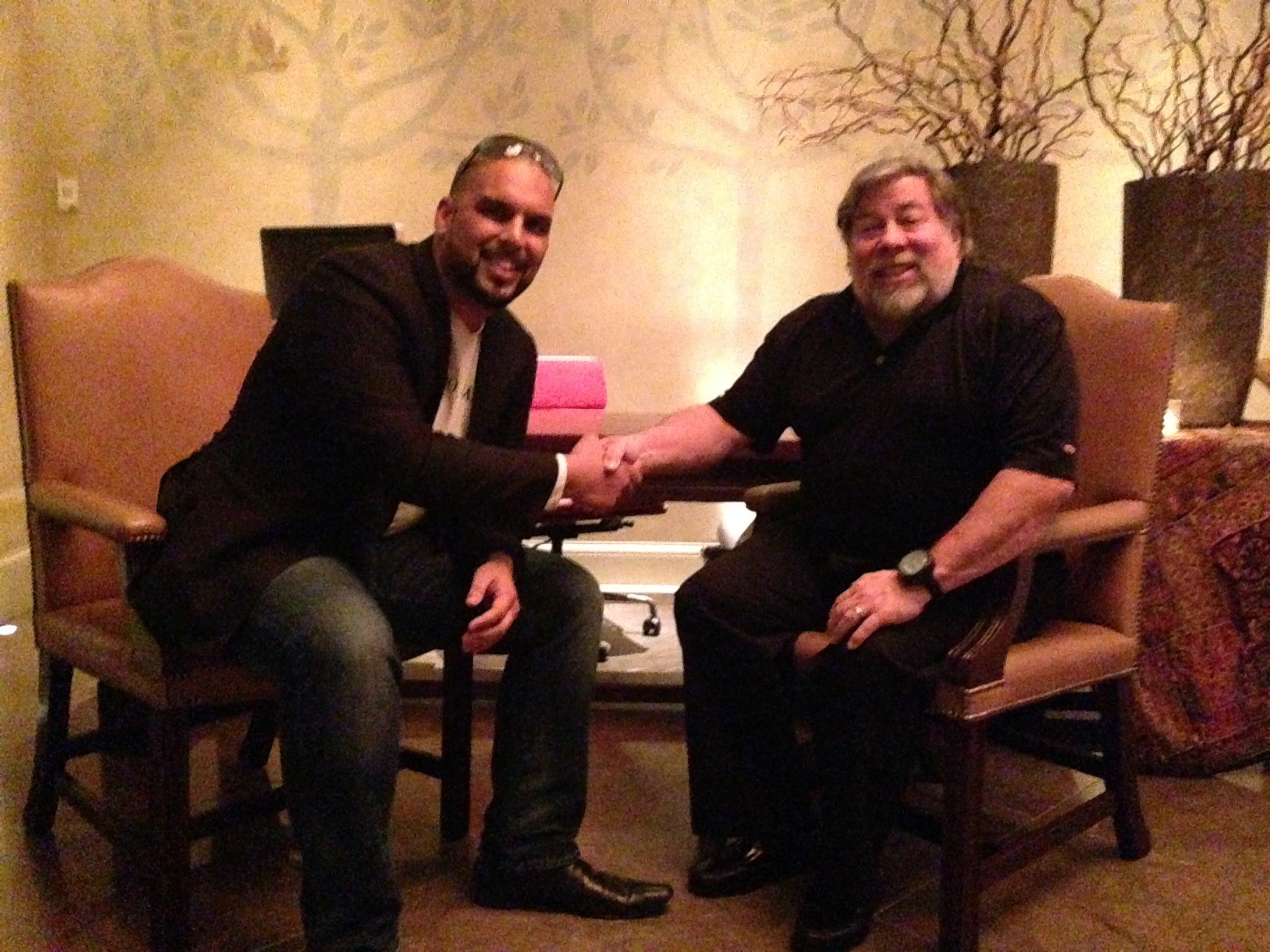
About the man on the right

Steve Wozniak.

Apple's co-founder. The engineer who built the Apple I largely on his own in 1976, designed the Apple II the year after, and turned the personal computer from a hobbyist kit into the machine on every kitchen table and classroom desk. The platform this studio gets paid to build on every day starts with the work he did on a desk in Cupertino and a garage in Los Altos, half a century ago.

AJ Joshi, Ikaroa founder, shaking hands with Steve Wozniak, co-founder of Apple
AJ Joshi·Ikaroa, founder·Steve Wozniak·Apple, co-founder

Why this matters to us

Proud to build for Apple.

We get paid to ship iOS apps. That is the work. But the reason the studio leads with iOS rather than the cross-platform shortcut is simpler than the business case: we genuinely care about the platform. Always have.

The discipline Apple draws out of an engineer is the discipline the whole studio is built on. Typography that respects every type size. Motion that respects every preference. Design that respects the user's attention. We learned half of what we know about good software from holding our work up to the bar Apple sets.

Every WWDC the team watches the keynote together. Every new framework that ships, we play with it the week it lands. Every Apple platform that opens up, we are there on day one. The work is paid; the loyalty is not.

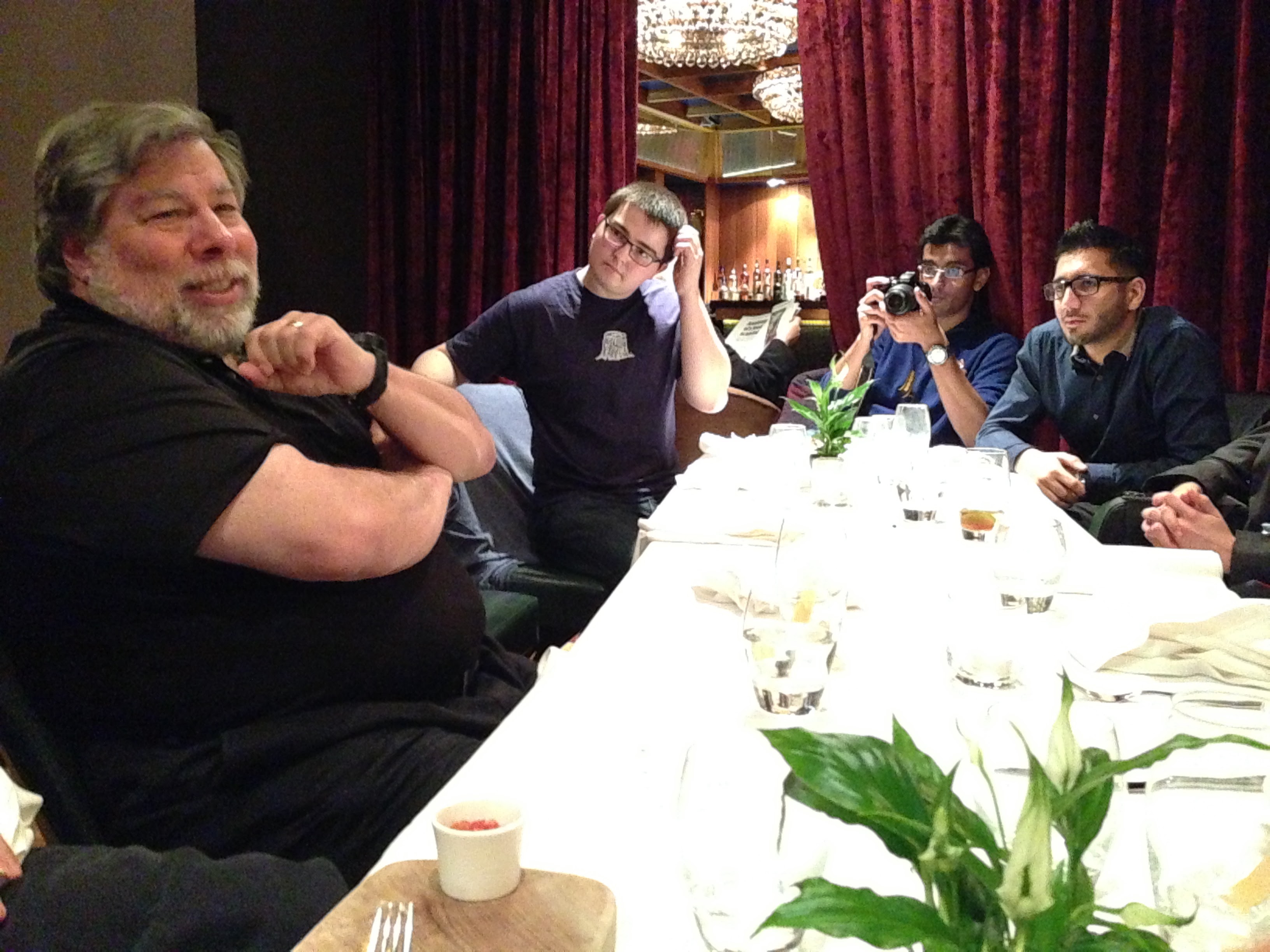
An evening with the co-founder

Four hours with Steve Wozniak.

A private dinner with the Ikaroa team and Apple co-founder Steve Wozniak. Four hours of conversation about how it all started, the foundations underneath everything we now take for granted, working with Steve Jobs, the direction the platform is going, and the future. Posted here not as a credential we earned, but as a reminder of whose shoulders the work stands on.

The work has been iPhone-shaped since the first iOS SDK shipped. Every app we build is a small return on the ground Wozniak and Jobs broke. The dinner was a chance to hear that history from the person who lived it, and to ask the questions a studio building on this platform every day actually wants to ask.

Photos shared with permission. Steve Wozniak is referenced here in his individual capacity and as a public figure; nothing on this page implies endorsement, sponsorship, business affiliation, or representation of Apple Inc. or Mr. Wozniak personally.

Steve Wozniak at a private dinner with the Ikaroa team, mid-conversation
Private dinner·Wozniak with the Ikaroa teamFour hours·Off the record

App Store readiness

The listing earns the install. We treat it like a launch.

App Store Optimisation is part of every iOS engagement, not an afterthought. Title, subtitle, keywords, screenshots, preview video, rating funnel, drafted, A/B tested in preview tooling, and shipped with the build.

Sample App

Lifestyle · Ikaroa

4.8 · 2.4k ratings

Editor's pick

Featured

Size

24.6 MB

Age

4+

Languages

8

Preview screens

Daily brief

Habits + streaks

Live activities

Insights

Sharing

Title + subtitle

Sample App, Habits Reimagined

Daily streaks, weekly insights, calmly designed.

Description excerpt

One app for the rituals that actually stick. Build streaks, track progress, see the trends, and never miss the next one with Live Activities and Lock Screen widgets.

Keyword strategy

  • habit tracker
  • daily routine
  • streaks
  • lock screen
  • live activity
  • minimal
  • no ads
  • apple watch
  • widgets
  • siri shortcuts

What ships with the listing

  • Five preview screens, two device sizes
  • A fifteen-second App Preview video
  • Localised metadata for the top eight markets
  • Privacy Nutrition Labels filed and reviewed
Sample listing · illustrative

The questions we always get

Ten plain answers.

How long does an iOS app take to build?

Every brief is different, and the honest answer is: it depends on the scope. A focused tool or field app is normally a small build because the surface area is small. A consumer product with payments, social, AR, or regulated data is a much larger build because the surface area is too. We scope each engagement specifically and share a timeline that is built around your brief, not lifted from a generic template, we will never quote you "twelve weeks because that is what we always say".

Native iOS or React Native / Flutter?

We build native unless there is a specific reason not to. Native gets you the full Apple ecosystem (Live Activities, Widgets, App Intents, Watch, CarPlay, Vision Pro), the best performance, and a codebase your team can recruit Swift engineers into. We do React Native for products where shared code with Android is more valuable than platform-specific polish, usually B2B tools rather than consumer apps.

What does an iOS app cost?

A complete consumer app from concept to launch starts around $60k. Field tools and lightweight utilities start around $30k. Larger builds with regulated data, social features, real-time sync, or AR run $100k to $250k. We share a scoped figure before any design work begins, and we never bill against an open-ended hourly rate.

Will it pass App Review on the first try?

Usually. We design against the App Store Review Guidelines from the first sprint, not as a checklist at the end. The most common rejection reasons are around metadata, privacy declarations, and crash-on-launch, all of which we catch during pre-submission. When something does come back, we reply same-day with the fix.

Do you submit the app under our developer account or yours?

Yours. Every app we build sits under your Apple Developer account and your App Store Connect record, so ownership of the listing, the build history, the reviews, and the analytics is yours from day one. We can submit on your behalf with a delegated role and hand the keys back whenever you want.

Will the app work on iPad as well as iPhone?

On every brief we ask. If iPad is part of the value proposition, the SwiftUI layout adapts to the larger canvas with proper split-views, multi-column lists, and pointer + keyboard support. If iPad is not strategic, we still ship a sensible iPad layout because the App Store penalises iPhone-only apps on iPad search.

What about Apple Watch?

Where the use case earns it. Health, fitness, transactional fintech, and live-context apps (transit, ride, delivery) almost always benefit from a Watch companion or independent watchOS app. We will tell you honestly in the brief whether Watch is worth the build or a distraction from the core flow.

How do you handle updates after launch?

Retainer or per-release. Most clients move to a monthly retainer that covers bug fixes, OS-update compatibility (every WWDC there is work), and a small monthly feature slot. We can also work on a per-release basis where the team batches up an update every quarter.

Can you build for Apple Vision Pro from the same codebase?

In some cases, yes. iOS apps run on Vision Pro in a "compatible" mode out of the box, and a SwiftUI codebase can be extended into a true spatial visionOS experience without a full rewrite. We assess whether the visionOS extension is worth the additional design work as part of the brief.

What testing do you run before submission?

Unit tests on the model + view-model layer, snapshot tests on the major screens, UI tests on the critical user flows, accessibility audits with VoiceOver and the Accessibility Inspector, performance traces in Instruments, and crash-free runs across the four iPhone sizes and at least one iPad. Plus a TestFlight cohort of real users for the last sprint.

Start an iOS engagement

Tell us about the product. We come back with a scoped plan.

An iOS lead replies within one working day with a recommended scope, a fixed-cost figure, and the cadence we would run the build at, scoped to your brief specifically, never lifted from a generic template. No retainer, no minimum, no agency-of-record contract.

  • Native Swift + SwiftUI
  • Fixed-cost engagements
  • Your developer account
  • Reply within 1 working day

Curious about the rest of the build cluster? Android · React Native · API + backend

No obligationReply in 1 working day

Brief an iOS build

An iOS lead replies within one working day with a recommended scope and a fixed-cost figure.

By submitting this form, you consent to Ikaroa contacting you via the email, phone, or other details you provide, in line with our terms and privacy policy. You can reply STOP, unsubscribe, or ask us to remove your details at any time.